Understanding how programming languages work under the hood can make a big difference in how you write, test, and optimize your code. One of the most fundamental distinctions in computer science is the difference between compiled and interpreted languages.
If you’ve ever wondered why C programs run faster than Python scripts, or why Java sits somewhere in between, this article will give you the full picture — in clear, simple terms.
Table of Contents
- Introduction to Programming Languages
- What Are Compiled Languages?
- How Compilation Works
- What Are Interpreted Languages?
- How Interpretation Works
- Key Differences Between Compiled and Interpreted Languages
- Examples of Compiled and Interpreted Languages
- Advantages of Compiled Languages
- Advantages of Interpreted Languages
- Disadvantages of Each
- Hybrid Approaches (JIT and Bytecode)
- Which Type Should You Choose?
- Real-World Examples and Use Cases
- Future Trends
- Conclusion
Introduction to Programming Languages
Programming languages are the tools that developers use to instruct computers on what to do. Whether you’re building a mobile app, designing a website, or creating artificial intelligence software, the language you choose determines how efficiently your program runs.
Every programming language must be translated into machine code — the binary instructions the CPU understands. This translation happens in two main ways: compilation or interpretation.
Compiled and interpreted languages differ mainly in when and how this translation takes place.
What Are Compiled Languages?
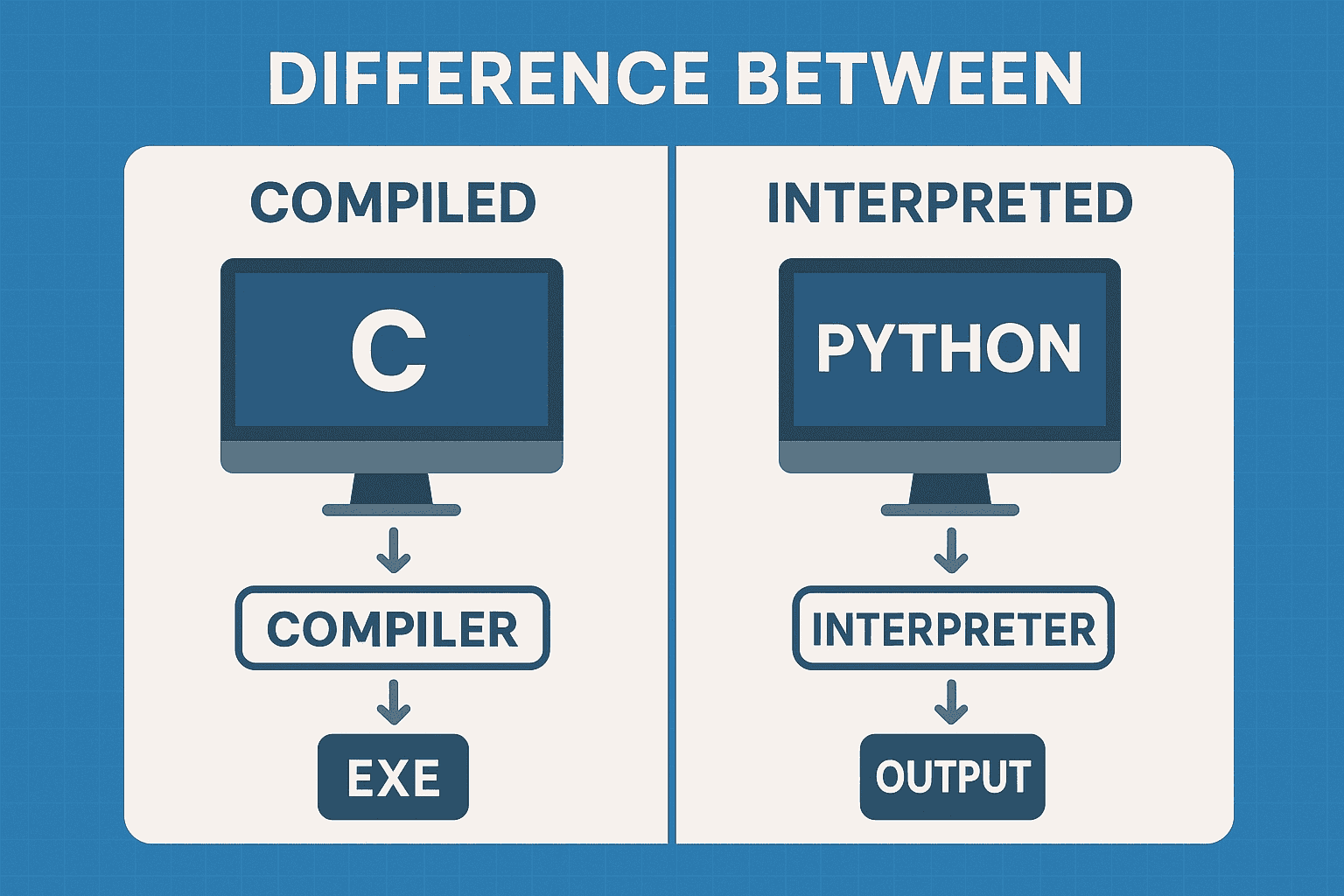
A compiled language is a type of programming language that requires a compiler to translate the entire program’s source code into machine code before execution.
In simple terms, you write the code, and the compiler converts it into an executable file. When you run that file, the computer doesn’t need to translate anything — it just executes the machine code directly.
Examples of compiled languages:
- C
- C++
- Go
- Rust
- Swift
These languages are known for their speed and performance, which is why they are used for system software, video games, and applications that require high efficiency.
How Compilation Works
To understand the process, let’s break down what happens when you compile code:
- Source Code Creation – You write the program in a high-level language (like C).
- Compilation – The compiler checks for errors and translates the code into machine code or an intermediate object file.
- Linking – The linker combines object files and libraries into a single executable file.
- Execution – The executable runs directly on the CPU without any further translation.
Once compiled, the program can run on any compatible machine without needing the compiler again.
That’s why compiled programs are faster — there’s no need to translate code during runtime.
What Are Interpreted Languages?
An interpreted language is one where the source code is translated line by line by an interpreter at runtime.
Unlike compiled languages, interpreted programs don’t produce an independent executable file. The interpreter reads each instruction, translates it into machine code, and executes it immediately.
Common interpreted languages include:
- Python
- JavaScript
- Ruby
- PHP
These languages are typically slower than compiled languages but easier to test and debug, making them ideal for scripting, automation, and web development.
How Interpretation Works
Here’s what happens during interpretation:
- Source Code Creation – You write code in an interpreted language (like Python).
- Execution – The interpreter reads the code line by line.
- Translation and Execution – Each line is translated into machine code and executed immediately.
- Output – The result of each instruction is displayed before moving to the next line.
Because the interpreter translates code on the fly, execution speed can be slower, especially for programs with many repetitive operations.
Key Differences Between Compiled and Interpreted Languages
Here’s a clear comparison to help you see the contrast:
| Aspect | Compiled Languages | Interpreted Languages |
| Translation | Entire program before execution | Line-by-line during execution |
| Execution Speed | Faster | Slower |
| Error Detection | At compile time | At runtime |
| Output | Executable file | No standalone executable |
| Portability | Platform-dependent | Platform-independent (needs interpreter) |
| Examples | C, C++, Go | Python, PHP, JavaScript |
| Memory Efficiency | More efficient | Less efficient |
| Debugging | Harder | Easier |
| Reusability | High (once compiled) | Limited |
This table summarizes the core difference between compiled and interpreted languages: it’s about when and how translation occurs.
Examples of Compiled and Interpreted Languages
Let’s take a closer look at some real-world examples.
Compiled Language Example: C
C is one of the most widely used compiled languages. When you compile a C program, it creates a .exe or binary file. Once compiled, it can run instantly without needing the source code.
Interpreted Language Example: Python
Python relies on the Python interpreter. You can run scripts directly without compiling, which makes testing and debugging much easier, but execution speed is slower compared to compiled programs.
Advantages of Compiled Languages
Compiled languages have several key benefits that make them ideal for performance-critical applications.
1. Faster Execution
Because the program is already translated into machine code, it runs directly on the hardware without delay.
2. Optimized Performance
Compilers often include optimization steps that improve runtime performance and reduce resource consumption.
3. Security
Since users execute compiled binaries instead of source code, the underlying logic is harder to access or modify.
4. Standalone Executables
Once compiled, you don’t need the compiler or source code to run the program. This makes distribution easier.
5. Better Resource Management
Compiled languages give developers more control over memory and system resources, leading to more efficient programs.
Advantages of Interpreted Languages
Interpreted languages have their own strengths, especially for modern web and scripting tasks.
1. Easier Debugging
Errors are detected as they occur, which makes debugging more intuitive.
2. Platform Independence
You can run interpreted code on any system that has the interpreter installed, without recompilation.
3. Rapid Development
You can test small code changes instantly, which speeds up the development process.
4. Flexibility
Interpreted languages allow dynamic typing, runtime modification, and fast prototyping.
5. Ideal for Web and Automation
Languages like Python and JavaScript are perfect for web servers, automation, and scripting tasks due to their adaptability.
Disadvantages of Each
Compiled Languages
- A longer development cycle (compiling each time code changes).
- Platform-specific executables.
- Harder to debug since errors are caught at compile time.
Interpreted Languages
- Slower execution due to on-the-fly translation.
- Requires an interpreter to run (less portable as a standalone).
- More resource-intensive during runtime.
Hybrid Approaches (JIT and Bytecode)
Many modern languages use a hybrid approach that combines compilation and interpretation for the best of both worlds.
Just-In-Time (JIT) Compilation
Languages like Java and C# first compile code into bytecode, an intermediate form.
Then, during execution, a JIT compiler translates bytecode into native machine code for faster performance.
Examples of Hybrid Languages:
- Java (JVM-based)
- C# (.NET CLR)
- Python (with PyPy JIT)
This approach offers a balance between portability and speed, giving developers flexibility without sacrificing too much performance.
Which Type Should You Choose?
Choosing between compiled and interpreted languages depends on your project goals.
- Choose a compiled language if:
- You need high performance and efficiency.
- The application involves heavy computations or real-time operations.
- You’re developing system software or games.
- Choose an interpreted language if:
- You prioritize flexibility, ease of debugging, and quick development.
- You’re building web applications, scripts, or automation tools.
- Cross-platform support is important.
In many cases, developers mix both — using compiled languages for core logic and interpreted ones for scripts or configuration.
Real-World Examples and Use Cases
Compiled Languages in Action
- C++ in game engines like Unreal Engine for high-speed rendering.
- Go for scalable backend systems.
- Rust in operating systems and browser engines for safety and performance.
Interpreted Languages in Action
- Python in data science, AI, and automation.
- JavaScript in front-end and back-end web development.
- PHP is used in content management systems like WordPress.
Each has its place depending on the problem being solved.
Future Trends
The line between compiled and interpreted languages is blurring. Technologies like JIT compilation, virtual machines, and transpilers allow languages to benefit from both methods.
For example, JavaScript engines like V8 (used in Chrome) compile code into machine code at runtime, dramatically improving speed. Similarly, Python interpreters like PyPy use JIT to accelerate execution.
As computing power grows, the focus shifts from pure speed to developer productivity, portability, and security — areas where interpreted and hybrid languages excel.
Conclusion
The difference between compiled and interpreted languages boils down to how and when code is translated into machine instructions.
- Compiled languages are fast, efficient, and great for performance-critical applications.
- Interpreted languages are flexible, portable, and ideal for rapid development.
- Hybrid models offer a balance of both.
Ultimately, the “best” language depends on your goals. Understanding these differences helps you make informed decisions and choose the right tool for the job.